


 Add to Chrome
 Firefox
Download Video From Link Free (Paste URL & Save MP4)
— Brendan Gray, Founder & Developer
You found a clip on YouTube, TikTok, Instagram, or another site and need a local copy. The fastest way to download video from link free is to paste the page URL into an online extractor that reads available streams ??? no browser extension, no sketchy installers.
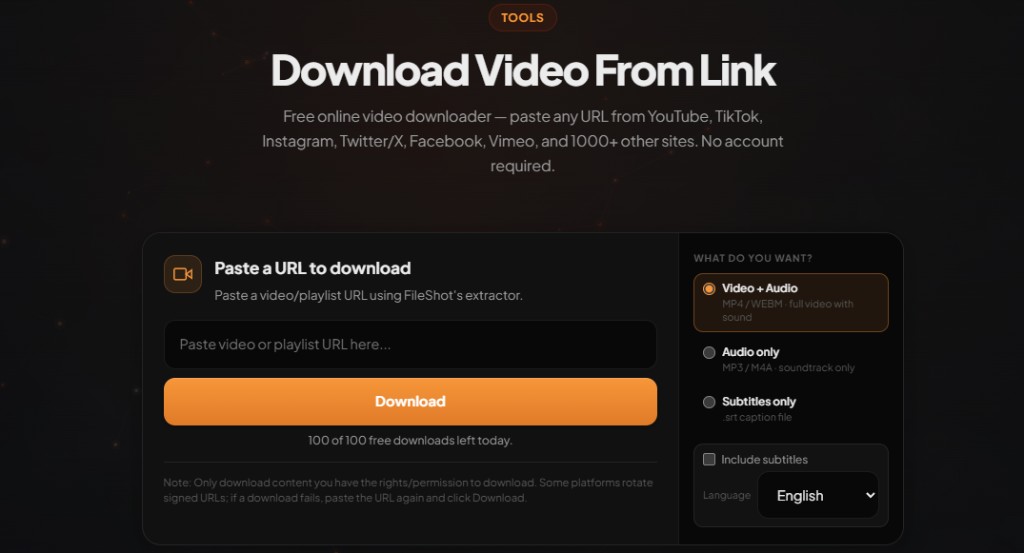
Download video from link free — paste any URL
Open Video Downloader →MP4, WEBM, and audio-only. No account required on free tier.
Why paste the page link instead of screen recording?
Screen recording re-encodes video and often drops audio sync. When you download video from link, you get the original stream the host serves ??? typically H.264 MP4 at 720p or 1080p. That means sharper playback, smaller files, and faster saves on slow connections.
Step-by-step: download video from link
- Open fileshot.io/tools/video-downloader.
- Copy the video page URL from your browser address bar (not a share-menu redirect if you can avoid it).
- Paste the link into the URL field and click Download.
- Wait for analysis — FileShot lists every stream the host exposes (resolution and format).
- Pick MP4, WEBM, or audio-only and save the file directly to your device.
Pro and Creator subscribers can paste multiple URLs in the batch panel for playlist-style workflows.
Platforms that work with one link
FileShot's extractor supports 1000+ hosts through a unified engine. Common examples:
- YouTube to MP4 — watch URLs and Shorts
- TikTok downloader — vertical clips
- Instagram video downloader — feed posts and IGTV
- Twitter / X video downloader
Troubleshooting failed links
If analysis fails: use the full page URL from the address bar, confirm the video is public, and avoid playlist or channel URLs when you only want one clip. Private, members-only, and age-gated content often cannot be extracted without signing in on the source site.
Legal and personal use
Only download videos you own, content released under open licenses, or material where you have explicit permission from the creator. Platform terms of service vary by country. FileShot provides this tool for legitimate personal use — not for redistributing copyrighted work without rights.
Related: Online video downloader guide · Download file from URL online free (video)
Frequently asked questions
How do I download video from link free?
Paste the video page URL into FileShot Video Downloader at fileshot.io/tools/video-downloader, click Download, wait for analysis, then choose your format and quality. No account is required for single downloads.
Is downloading video from a link legal?
Laws vary. Download only content you have rights to save ??? your own uploads, Creative Commons media, or clips with creator permission. Do not redistribute copyrighted material.
What format should I pick?
MP4 (H.264) plays everywhere ??? phones, TVs, editors. Choose WEBM if you need VP9 at smaller sizes. Pick audio-only (M4A/MP3) for podcasts or music clips.
Why does my link say analysis failed?
Common causes: shortened URLs, private posts, playlist URLs instead of single videos, or hosts that require login. Copy the direct watch URL and try again.
Do I need to install software?
No. FileShot runs in the browser. The server analyzes the page and delivers a direct download link to your device.
Free Online Video Downloader
Paste any URL. MP4, WEBM, audio-only. No watermark.
Open Video Downloader →